Multi-ZIP delivery analysis
Analyses multiple ZIP files as one delivery, including multi-archive patterns commonly produced by services such as Google Drive.
Multi-ZIP Delivery Reconstruction · macOS
Humpty reconstructs file deliveries that arrived fragmented across multiple ZIP archives. It analyses the parts as one delivery, assesses Delivery Health, shows Insights and a Recovery Plan, rebuilds the logical folder structure, helps verify the result with CRC and size checks, then records what happened — privately on your Mac.
Available on the Mac App Store · Requires macOS 14 or later

The multi-ZIP problem
When a large folder is divided into several downloads — a multi-archive delivery pattern commonly produced by services such as Google Drive — extracting each ZIP separately can leave duplicate folders, scattered files and a structure that no longer matches the original delivery.
Humpty treats those ZIP parts as one delivery: analyse, assess health, plan, reconstruct, verify and report.
Humpty is an independent Burger Labs product and is not affiliated with, endorsed by or sponsored by Google or Google Drive.
How it works
The workflow is deliberate: multi-ZIP parts → Recovery Analysis → Delivery Health and Insights → Recovery Plan → destination and safety preflight → reconstruction → CRC and size verification → Recovery Report and History.
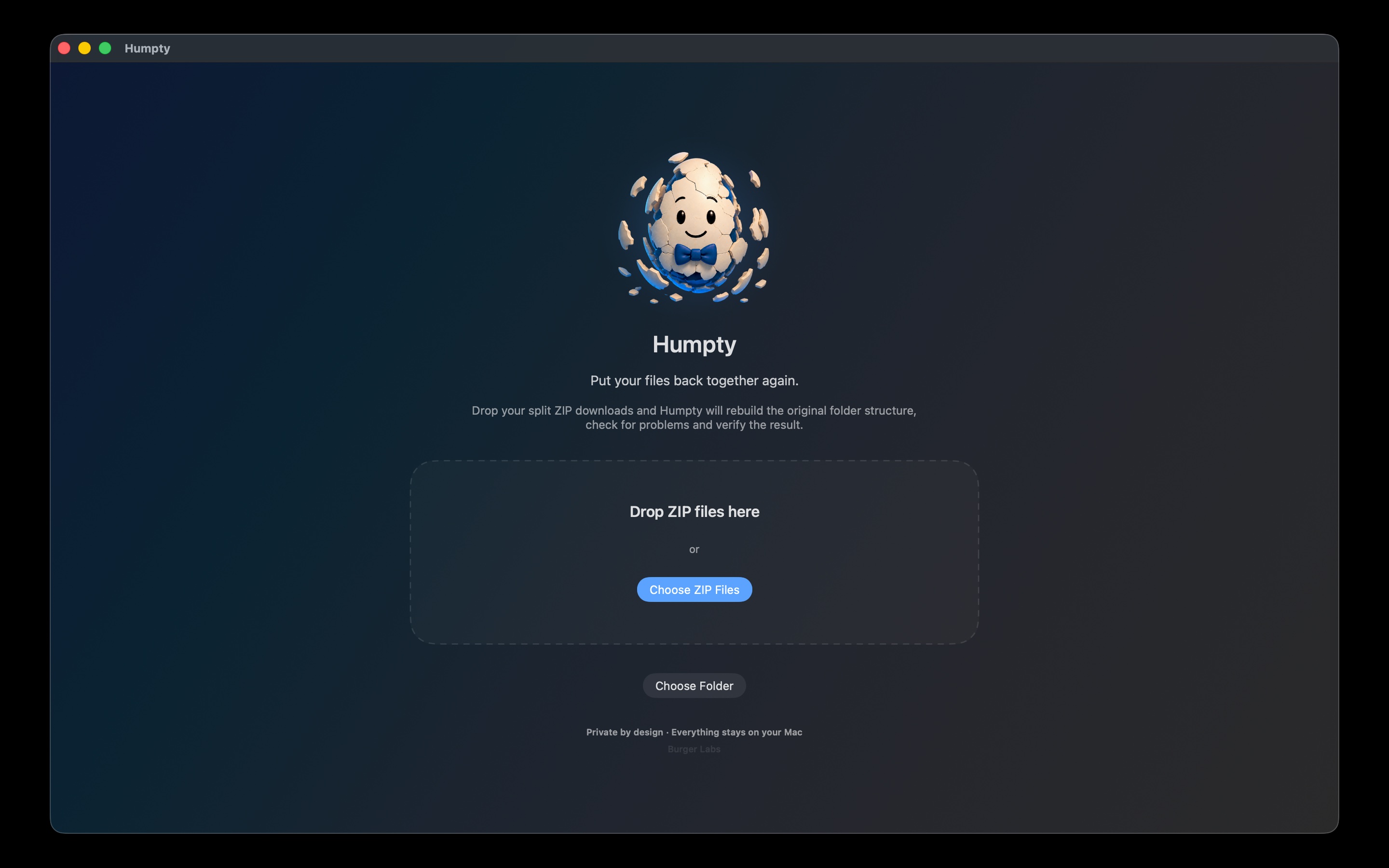
Drop in every ZIP from the same delivery, or choose a folder of ZIP parts. Humpty analyses them together rather than as unrelated extraction jobs.
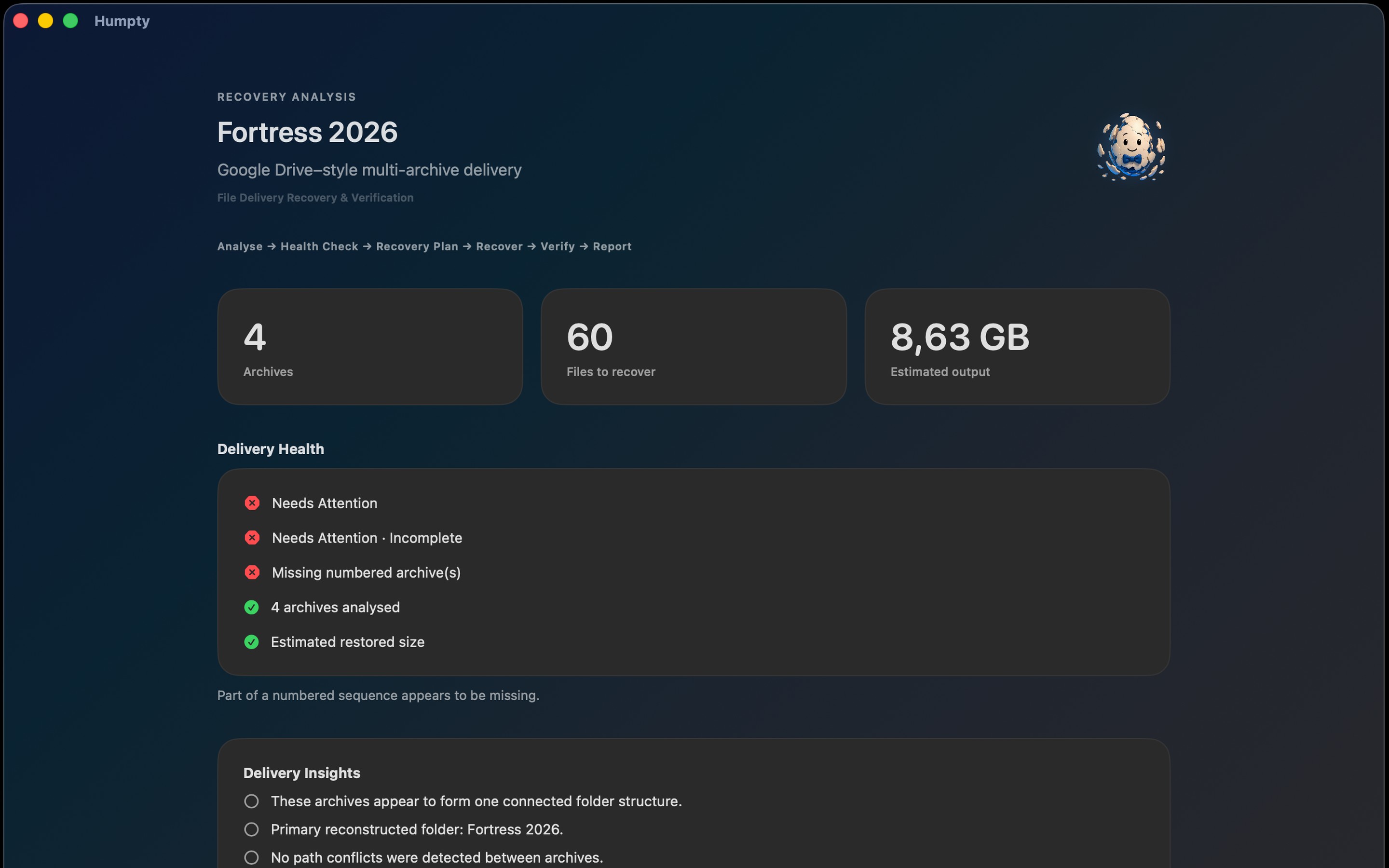
See Delivery Health, Insights and incomplete numbered-delivery warnings before anything is written.
Review how Humpty intends to reconstruct the logical folder structure, then choose a destination. Disk-space preflight and unsafe-path protection run before recovery starts.
Humpty rebuilds the delivery, helps verify recovered files with CRC and size checks, then gives you a Recovery Report you can open, copy or export — with Recovery History for earlier jobs.

The app
Humpty makes the job visible: what it found, how folders will be reconstructed, how recovery is progressing and whether verification checks passed.


Built for careful recovery
Analyses multiple ZIP files as one delivery, including multi-archive patterns commonly produced by services such as Google Drive.
Rebuilds nested project folders across every archive in the delivery instead of treating each ZIP as a separate extract.
Review Delivery Health, Insights and the Recovery Plan before recovery begins — including incomplete numbered-delivery detection.
Detects applicable duplicate and filename-conflict situations during recovery. Humpty does not silently overwrite an existing file.
Checks available disk space, protects against unsafe archive paths and keeps writes inside the destination you choose.
Helps verify recovered files against archive data using CRC and size checks, then records the outcome in a Recovery Report.
Open, copy or export the Recovery Report after a job. Review previous recoveries in Recovery History.
Source ZIP archives remain where they are during normal recovery. Only after recovery may you explicitly choose “Move source ZIP files to Trash…”.
Humpty is not affiliated with, endorsed by or sponsored by Google or Google Drive.
Humpty support
Humpty includes an in-app Help Centre (Help → Humpty Help Centre). Use the guide below for the same workflow online, or email Burger Labs and include the number of ZIP files, your macOS version and the message Humpty displayed. Please do not attach private archives unless we specifically ask for a safe sample.
Email Humpty supportHumpty Help Centre FAQ Humpty privacy Burger Labs privacy Terms Site support

Humpty Help Centre
Plain-language guidance for everyday Mac users. Open a topic below, or use the matching Help Centre inside the Humpty app.
Humpty is built for fragmented deliveries that arrive as multiple ZIP archives. It analyses the parts together, reconstructs the logical folder structure, identifies delivery problems before recovery, performs protected recovery, helps verify the result and records what happened. It is not positioned as a generic single-ZIP unzip utility.
Add every ZIP from the same download: drag and drop the files onto Humpty, choose ZIP files, or choose a folder that contains those ZIPs. Include all parts before starting analysis so Humpty can treat them as one delivery.
Before writing files, Humpty runs Recovery Analysis on the selected delivery. You can review what it found — including archive readability, folder structure across parts, and conditions that may affect recovery — so you decide whether to continue.
Delivery Health summarises conditions discovered in the delivery that may affect recovery. Treat warnings seriously: they highlight problems Humpty found before reconstruction, such as incomplete sequences or other recovery risks shown in the app.
Insights present useful findings from analysis — for example how parts relate, what structure Humpty detected, or issues worth reviewing — so you understand the delivery before recovery starts.
The Recovery Plan shows how Humpty intends to reconstruct the delivery. Review the planned folder structure and related details, then choose a destination before starting recovery.
Humpty can identify incomplete numbered archive deliveries and warn when part of a sequence appears to be missing. That warning means Humpty did not receive every expected part from the sequence it detected. It does not claim that files absent from the archives you provided were recovered. Humpty also avoids combining unrelated numbered filename stems into a false sequence.
During the recovery workflow Humpty detects applicable duplicate and filename-conflict situations. Conflicts and existing destination files are handled so nothing is silently overwritten. Humpty does not automatically delete destination files as a cleanup step.
Choose the folder where the reconstructed delivery should be written. Humpty writes only inside that destination and creates folders as needed.
Before recovery begins, Humpty checks available disk space at the destination as part of the safety preflight. If space is insufficient, free space or choose another destination.
When you start recovery, Humpty reconstructs the logical folder structure across the selected archives into your destination. Progress reflects genuine recovery work. Source ZIP files are read, not rewritten, during normal recovery.
After reconstruction, Humpty performs CRC and size verification to help verify recovered files against archive data. These checks help confirm what was written; they are not a cryptographic guarantee. Review the on-screen result and the Recovery Report for the outcome.
When recovery finishes, open the destination folder from Humpty or Finder and inspect the reconstructed project. Use the Delivery Recovered summary and Recovery Report to see counts, warnings and verification results.
After recovery, open the Recovery Report in Humpty. From there you can copy the report contents or export it to a location you choose. Reports stay on your Mac.
Recovery History keeps records of previous recovery operations so you can review earlier jobs and their outcomes in the app.
Source ZIP archives remain untouched during normal analysis and recovery. They are not automatically deleted.
Only after recovery may you explicitly choose “Move source ZIP files to Trash…”. This is optional and never happens automatically. Use it only when you are satisfied with the recovered result.
Archive analysis and recovery occur locally on your Mac. Humpty does not upload the contents of your archives to Burger Labs.
If Delivery Health warns that a numbered sequence looks incomplete, add the missing ZIP part and analyse again. For unreadable archives, re-download that part. If disk space is low, free space or change destination. If a path is blocked as unsafe, choose a different destination. For conflicts, open the destination and review any renamed conflict copies. Email Burger Labs with the ZIP count, macOS version and on-screen message if you need help.
Privacy
Humpty analyses, recovers and verifies archive contents locally on your Mac. The contents of the ZIP files you select and the files Humpty recovers are not uploaded to Burger Labs.
If you contact Burger Labs for Humpty support, we receive the email address, message and any diagnostic information you choose to send. Do not send private archives or recovered files unless we specifically request a safe sample and you are authorised to share it.
Frequently asked questions
Humpty reconstructs a folder that was divided across multiple ZIP archives: multi-ZIP analysis, Delivery Health, Insights, a Recovery Plan, logical folder reconstruction, protected recovery, CRC and size verification, and a Recovery Report — instead of leaving separately extracted pieces.
Humpty is designed to handle multi-archive delivery patterns commonly produced by services such as Google Drive. It can also help with similarly structured deliveries from other services. Humpty is not affiliated with, endorsed by or sponsored by Google or Google Drive.
No. Humpty is an independent Burger Labs product and is not affiliated with, endorsed by or sponsored by Google or Google Drive.
No. Archive analysis and recovery take place on your Mac. Humpty does not upload the contents of your archives to Burger Labs.
No. Humpty reads the source archives and writes the reconstructed result to the destination you choose. Source ZIPs stay untouched unless you explicitly select “Move source ZIP files to Trash…” after a recovery.
No. Humpty does not silently overwrite existing files at the destination. Duplicate and conflict situations are handled so your existing data is protected.
Humpty may show an incomplete numbered-delivery warning. That means part of a detected sequence was not supplied. It does not claim that files absent from the archives you provided were recovered.
Humpty uses CRC and size checks to help verify recovered files against archive data. These checks help confirm the written result; they are not presented as cryptographic verification.
Humpty requires macOS 14 or later.
Humpty is available on the Mac App Store. Download on the Mac App Store. Humpty requires macOS 14 or later.
Humpty is available on the Mac App Store.
Humpty is an independent Burger Labs product and is not affiliated with, endorsed by or sponsored by Google or Google Drive.